Fleet Maintenance Software Explained: Features and Fit
Only 13% of fleets describe their technology systems as well integrated and sharing data automatically, according to Motive research conducted with FreightWaves Research. Read that in operational terms. In most shops the inspection lives on a paper form, the repair lives in a text thread, and the parts invoice lives in a filing cabinet. The technician on the next shift gets none of them.
For a Tampa Bay operation running tractors, trailers and Walking Floor equipment, that gap costs money in a specific way. Walking Floor faults announce themselves as symptoms first: a floor that unloads unevenly, a fitting that weeps, a slat that drags on the rail. Whether those symptoms get diagnosed on a Tuesday morning or become a roadside breakdown on I-4 depends almost entirely on whether someone wrote them down and whether the next person found the note.
Fleet maintenance software is the system that holds the notes. Judged well, it's a work-control tool. Judged badly, it's a subscription that adds data entry to a job that already runs short of hours. The difference sits in how you configure it and how strictly your team uses the record.
Table of Contents
- What Fleet Maintenance Software Includes and Why It Exists
- Why Planned Maintenance Costs Less Than Breakdowns
- How a Defect Becomes a Returned Vehicle
- Configuring Software for Trucks, Trailers and Walking Floors
- Compliance Records the Software Must Keep
- Metrics That Show the Software Is Working
- Confirm Fit Before You Buy
What Fleet Maintenance Software Includes and Why It Exists
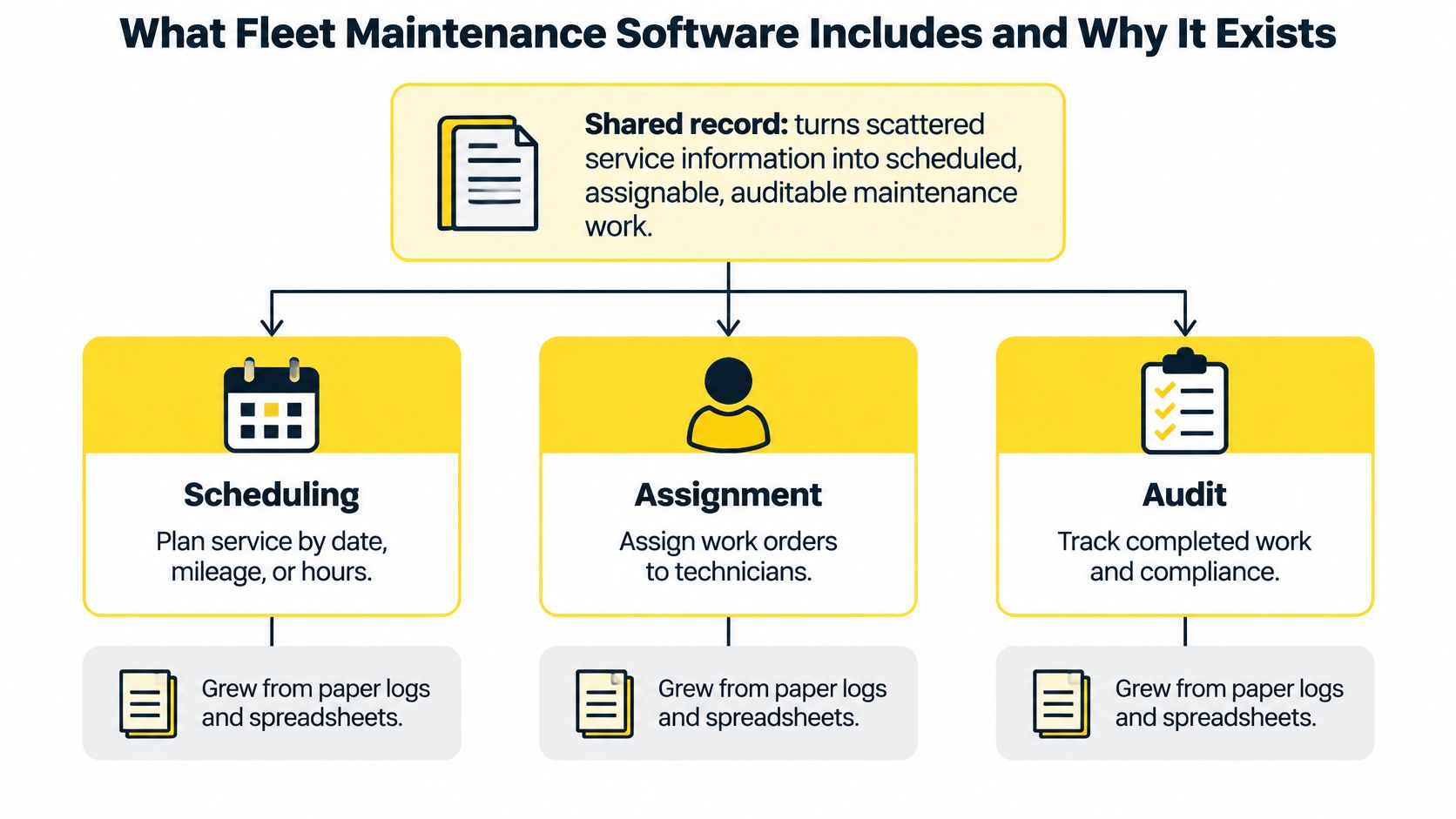
Fleet maintenance software is a shared record that turns scattered service information into scheduled, assignable and auditable work. Every screen in a demo, from the overdue list to the fault-code alert, reads from that record. If the record is thin, the screens are decoration.
It grew out of the paper logbook
The category started as a digital version of the maintenance log. Service intervals went into a spreadsheet first, then work orders, then parts, then telematics. Each addition solved the same underlying problem in a new place. A preventive schedule stops a service from being forgotten. A work order stops a repair from vanishing between shifts. A parts record stops a technician from discovering at 4pm that the fitting isn't on the shelf.
The test is whether a technician can answer three questions in under a minute: when was this unit last serviced, what did the last technician find, and which parts went into it. Most yards can answer one of the three, in one place, for some of the units.
Think of it as a patient chart
A hospital doesn't ask the night nurse to remember what the day nurse observed. Every patient gets a chart, and the chart travels with the patient. A tractor or trailer needs the same thing, because trailer and hydraulic faults repeat. A floor that unloads unevenly in March and again in July is one problem with a history, not two coincidences.
The infographic below shows the three jobs the shared record does.
The modules that carry the work
Seven modules do the daily work. The entries below are illustrative examples, not real records.
Core modules and what each one records
| Module | What It Records | Illustrative Entry | Problem It Solves |
|---|---|---|---|
| Preventive maintenance schedule | Service intervals by miles, engine hours or calendar time | Tractor at 24,800 miles and due Friday; trailer due on the hour meter | Missed services |
| Work orders | Repair jobs with technician, status, labor and parts | Order 1187: hydraulic leak on a Walking Floor trailer, technician assigned, one cylinder reserved | Lost repair history |
| Vehicle history | Every service, defect and repair per unit | Trailer 7 slat replaced twice in 12 months | Recurring failures hidden in memory |
| Inspections and DVIR defects | Driver defect reports and inspection results | Driver reports brake pull, flagged high severity | Defects lost in shift handoffs |
| Parts inventory | Stock levels, reservations and parts used per job | Two cylinders on the shelf, one reserved against order 1187 | Repairs waiting on parts |
| Telematics and fault codes | Odometer, engine hours and diagnostic codes | Fault code triggers a work order | Delayed defect detection |
| Reporting and dashboards | Overdue services, cost per unit and repeat repairs | Overdue PM list by location | Decisions made from memory |
Fleets that run the schedule and the work order but skip parts usually meet the gap during a repair rather than before one. Fleets that keep a history but no defect reporting find out about a recurring failure three invoices late.
Why Planned Maintenance Costs Less Than Breakdowns
The economics here aren't subtle. tech.co's analysis of reactive fleet spending puts the average unplanned breakdown at roughly $2,491 per vehicle event, against about $1,481 for the same vehicle's average annual preventive-maintenance expense. One failure costs more than a year of scheduled servicing, and the repair invoice is the smallest part of it.
| Item | Reported figure |
|---|---|
| Average unplanned breakdown | about $2,491 per vehicle event |
| Average annual preventive maintenance | about $1,481 per vehicle |
Those are industry averages, useful for framing and useless for budgeting. Your own records decide the number.
What the gap looks like on a trailer
Say a Walking Floor trailer loses hydraulic pressure on the way to an aggregate delivery. The truck waits, the load shifts, the receiving site turns the truck away, and the repair happens under time pressure with whatever part is nearest. The reported averages put that single event above a year of planned service on the same trailer, before the missed load and the rescheduled delivery are counted.
Planned work on the same trailer looks nothing like that. A weeping fitting found during a scheduled inspection is a fitting and an hour of shop time. A pressure and flow check that catches a failing cylinder before it strands a driver is the cheapest diagnostic in the building.
Run the arithmetic on your own units
Three numbers, one page, no software needed for the calculation:
- Annual planned service spend per unit. Pull it from your invoices for the last 12 months, split by tractor, trailer and hydraulic equipment.
- Breakdown events per unit in the same period. Count roadside calls and unplanned shop visits, not just major failures.
- Average days out of service multiplied by your daily downtime cost. Include the missed load and the replacement equipment rental.
Compare the three lines. In most mixed fleets the planned spend is stable year to year and the breakdown line is the one that moves.
The number most fleets can't produce: ask what a day of downtime costs per unit and you usually get a shrug. Write it down once, and every repair approval after that gets easier to defend.
Software shifts work from reactive to scheduled through due-date and mileage alerts, defect prioritization, approval steps and a dashboard of overdue service and repeat failures. It doesn't prevent the failure. It shortens the distance between the symptom and the scheduled fix, which is the only part of the risk you control. Brothers Truck Trailer Repair and Welding Corp. builds Walking Floor preventive maintenance on that same logic: scheduled service to avoid costly breakdowns, with the system tuned for maximum efficiency rather than repaired after it quits.
How a Defect Becomes a Returned Vehicle
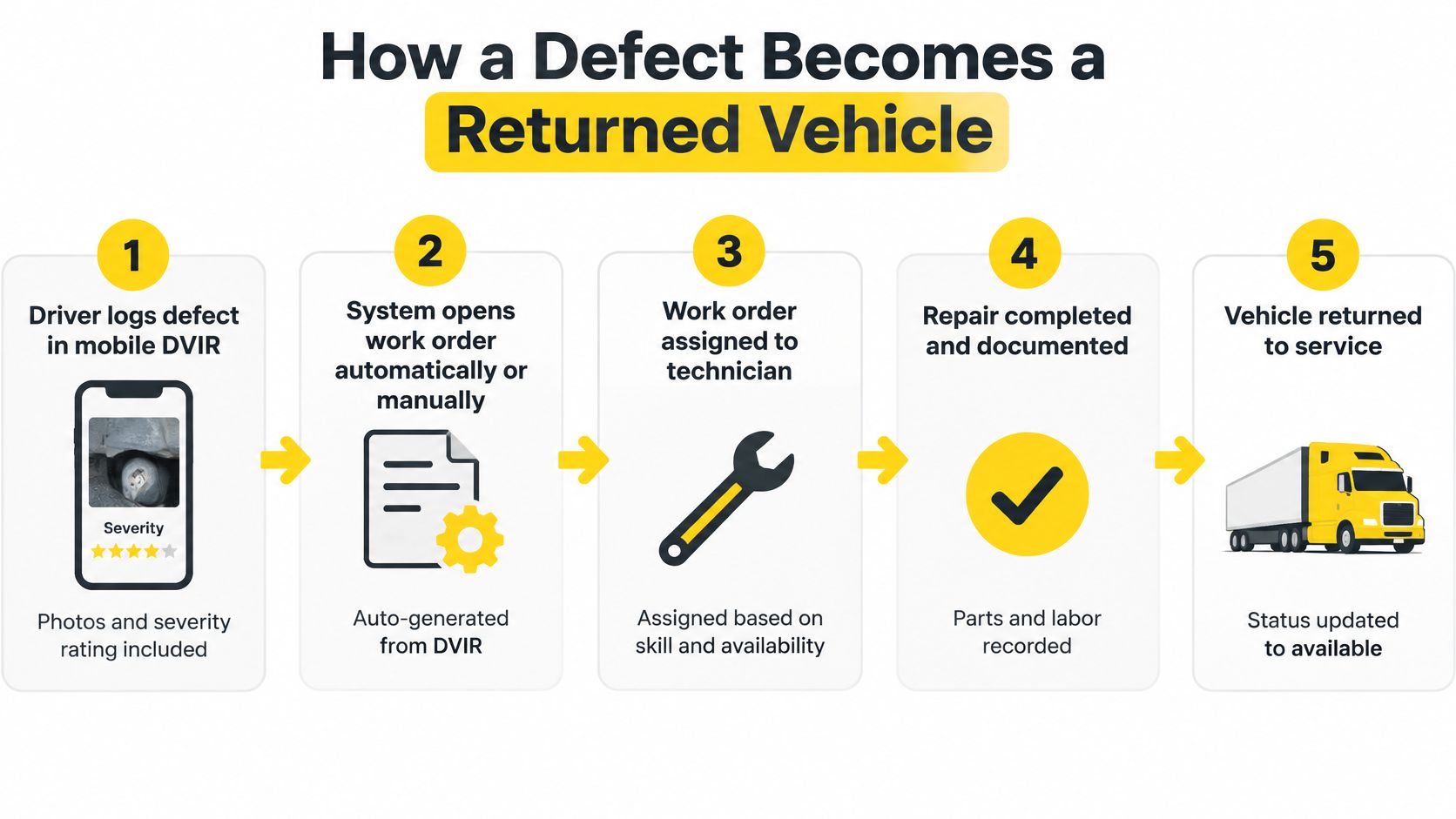
A defect earns its keep only when it becomes a task, and a task is finished when someone certifies the fix. That loop is what you're buying. When it runs properly, a driver's two-line note at 6am becomes a scheduled repair and a documented return to service by the same afternoon.
The infographic below maps the loop from the driver's phone to the yard status board.
The seven steps that have to connect
- The driver logs the defect. A pre-trip inspection with a photo of the leaking fitting and a severity rating takes two minutes. Skip that capture and the same leak gets found 200 miles out, where it costs a tow and a missed delivery.
- The report becomes a work order. Either the system opens one automatically from the DVIR or a dispatcher creates it that morning. The hours between report and ticket are where defects die.
- Triage decides whether the unit moves. Brake, steering, frame and tire defects keep the unit parked. Cosmetic damage and minor items get scheduled. FMCSA's inspection, repair and maintenance rules require that a defect affecting safe operation be repaired before the vehicle is dispatched again, so this step isn't a preference.
- A technician records the diagnosis and a manager approves the cost. The software stores the symptom; the technician supplies the cause. That diagnosis field is what makes the history valuable six months later, and the approval step keeps the invoice from arriving as a surprise.
- Parts get reserved against the job. The reservation turns "I think we have one" into a same-day repair. If the part isn't on the shelf, the work order should show the wait, because that wait is your real downtime.
- The repair is completed and certified. The certification on the original report states the repair was made or that repair wasn't necessary. This step converts shop work into a compliance record.
- The unit returns to service and the status updates. Dispatch sees an available unit, and the history keeps the entry, so the next occurrence of the same symptom starts from a known cause.
A hydraulic leak from start to finish
A Walking Floor trailer rolls in at shift start with fluid on the frame and a driver reporting slow floor movement. The driver logs it with a photo and a high severity rating. Triage parks the unit.
At that point the software holds three facts: wet frame, slow slats, high severity. It cannot say whether the cause is a loose fitting, a worn slat edge or a hydraulic fault upstream. The technician traces the leak to a fitting and finds a worn slat edge binding on the rail, so a replacement slat and the fitting are reserved from stock against the same job. By the end of the day the repair is certified on the original report and the trailer is back on the board.
The distinction matters for the record. "Slow floor movement" is a symptom entry. "Worn slat binding on the rail" is a diagnosis, and only the second one shortens the next repair. I'd rather lose a photo field at setup than lose the diagnosis field, because the photo documents one event while the diagnosis informs every future one.
The slip that breaks more audit trails than anything else is closing the work order without the certification step. The repair happened, the part was consumed, the trailer ran, and the proof is missing.
Two fields, one habit. If the certification isn't signed on the report, the record stops being a compliance document and becomes a shop note.
A short video walkthrough sits below for teams weighing a mobile inspection step.
Configuring Software for Trucks, Trailers and Walking Floors
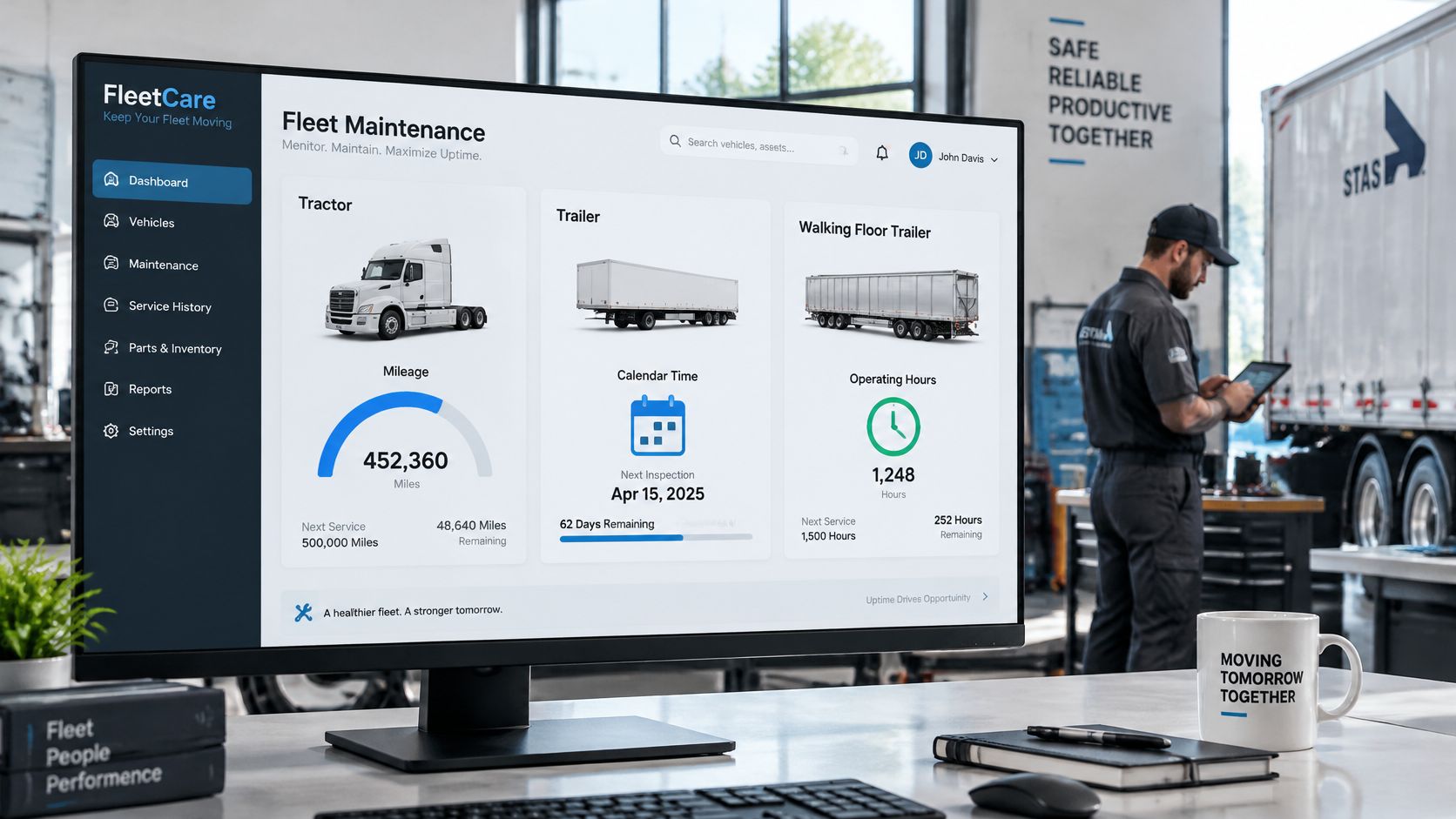
Most platforms ship with a mileage interval as the default, because the platform was built around tractors. A mixed fleet needs at least three rule types: miles for tractors, calendar time for trailers that sit between runs, and operating hours for hydraulic equipment. One shared calendar rule produces due dates that have nothing to do with the work a trailer did.
Start with the hydraulic clock
Keith's Running Floor II DX/DXE owner/operator manual lists a monthly service at 25 operating hours, and its wet-kit specifications state that the hydraulic power unit must not exceed the system's maximum flow rate or pressure. Two consequences follow. The interval is tied to hours, not weeks. And the diagnosis has to begin with pressure and flow inside the rated limits, not with a parts swap.
Take one Walking Floor trailer on aggregate duty. If its hydraulic system logs 25 operating hours inside a single week of two-shift work, the monthly service falls due weekly. A dry van on the same calendar rule might be serviced five times a year and never once be overdue. Same software, opposite results, decided entirely by the meter setting.
Fields to set up before go-live
- Meter type per asset. Odometer on tractors, engine or operating hours on the hydraulic power unit, calendar on low-use trailers.
- Component history. Slat and bearing replacement dates, cylinder and control valve service, so a repeat failure shows up as a pattern instead of a surprise.
- Hydraulic readings. Pressure and flow values recorded against the rated limits at each service, which is what turns a vague “floor is slow” complaint into a comparison.
- Fault notes. Recurring codes and symptoms written in the same words each time, because a search only works if the vocabulary is consistent.
- Parts link. Slats, bearings and cylinders tied to the work order, not to a separate spreadsheet., so the part number on the order matches what goes on the trailer.
The dashboard below is where those fields surface as a daily list instead of a filing exercise.
What the telematics link adds
ATRI's September 2026 report on how trucking uses telematics data, as reported by Trucking Dive, found that 48% of fleets do not integrate telematics with maintenance-management software, a gap that is more common among smaller fleets.
The gain is event-driven maintenance. A meter reading, a fault code or a DVIR can open and prioritize a work order without anyone remembering to check. The cost is setup time and a feed that has to be mapped to your truck makes rather than the vendor's demo units.
Close the loop with the repair shop
A specialist who diagnoses a hydraulic fault and replaces two slats knows more about that trailer than the software ever will. Ask for the findings and the parts used in writing, then put them in the unit record. We specialize in the repair and maintenance of Walking Floor systems and in hydraulic diagnosis and repair, and the useful version of that work ends with a written finding the fleet can file, not a verbal handoff at the counter.
Compliance Records the Software Must Keep
Federal rules cover every commercial motor vehicle under a carrier's control, including trailers and intermodal equipment, and they require the frames, suspension systems, axles, wheels, rims and steering components to stay in safe and proper operating condition, as the FMCSA safety planner sets out. A maintenance program that only covers the tractor misses half the asset base.
The 49 CFR Part 396 text also requires a periodic inspection at least once every 12 months for each commercial vehicle, including every segment of a combination, covering at least the items in Appendix A. It sets minimum qualifications for anyone inspecting, servicing or repairing commercial vehicle brakes: a state, provincial, federal or union training program, a state-approved program, qualifying certification training that may include the CDL air-brake test, or one year of brake-related training and experience, or a combination of those.
What the software has to prove
| Requirement | Source | Record to Keep |
|---|---|---|
| Periodic inspection of every unit, including each trailer, at least every 12 months | 49 CFR Part 396 | Inspection date, items checked, inspector and next due date |
| Defects affecting safe operation repaired before dispatch | 49 CFR Part 396 | Defect, repair date, technician and certification on the report |
| Frame, suspension, axles, wheels and steering kept in safe condition | Federal motor carrier maintenance rules | Component service history for each trailer and tractor |
| Brake inspection and repair staff meet minimum qualifications | 49 CFR Part 396 brake rules | Technician name, qualification pathway and training date |
| Recurring defects documented over time | Carrier maintenance program | Defect count per unit by month and component |
Software stores the proof. It doesn't decide compliance. A vendor can't tell you whether a unit is roadworthy, and an overdue flag isn't a legal opinion. What the system does is make the record findable during an audit and, more usefully, before dispatch.
Routine oil and fluid service, brake and suspension inspections and roadworthiness checks belong in the same unit history as the annual inspection, not in a separate binder kept by whoever runs the shop. When those services live in one record, a defect from a driver inspection and the repair that followed it sit three lines apart, which is where a pattern becomes visible.
Metrics That Show the Software Is Working
Count the features and you learn nothing. PM currency, the share of required services completed on time, is the first number to watch.
| Metric | How to Calculate | Reference Value | Weak Result Points To |
|---|---|---|---|
| PM currency | Services done on time divided by services due | 95% or higher, set per asset class | Missed intervals or wrong meter rules |
| Unplanned downtime share | Days out of service for breakdowns divided by total unit-days | No fixed benchmark, so compare by asset class quarter to quarter | Preventive program not catching failures |
| Average days to resolve | Days from work order open to close | 1.68 days in Fleetio's 2024 benchmarking data | Approval or parts delays |
| Alert-to-confirmed-defect rate | Confirmed defects divided by total alerts | Most alerts confirmed before you add a new alert type | Sensor coverage or threshold tuning |
| Repeat repairs | Same defect reopened within a set period | No reopenings on the same component inside 30 days | Diagnosis or part quality problem |
| Inspection completion | Completed DVIRs divided by required DVIRs | Every required DVIR | Driver process gap |
Calculate PM currency per asset class, never fleet-wide. A Walking Floor trailer on aggregate duty and a highway dry van don't share a sensible target, and averaging them hides the trailer that's slipping.
Where the alerts stop short
Diagnostics, not alerts, remain the hard part. Turnaround is the measure to watch: 1.68 days was the average time to resolve a vehicle issue in Fleetio's 2024 benchmarking data, as Fleet Maintenance reported. Predictive alerts are only as good as the data behind them.
Expect false positives, and expect them in predictable places. Trailers have thin sensor coverage, so most trailer faults arrive as an inspection finding rather than a code. Odometer and hour readings drift when a meter is replaced or a unit runs on swapped power. Walking Floor hydraulic symptoms often produce no useful electronic code at all: a floor that runs slow, a cylinder that chatters, a valve that hesitates. Those need a technician with a pressure gauge, not a dashboard.
A rule for alert volume: a system that fires 40 alerts a week and confirms six isn't monitoring anything. Track the ratio before you switch on another alert type.
Confirm Fit Before You Buy
Start with the day-to-day reality for most buyers. A November 2025 survey of more than 2,000 small fleet operators by Vehicle Management Systems found that about 65% run fleet operations entirely on their own, 54.5% complete most fleet tasks after hours, and 41% of fleets under 50 vehicles estimate annual downtime losses of $10,000 to $50,000. A system that saves the manager an hour a week beats one that adds a nightly data-entry session.
The verdict by fleet size
One to five trucks. Buy a mobile inspection log, a shared repair history and parts visibility. Predictive analytics can wait; you don't have the data volume to feed them and you won't maintain the discipline.
A regional hauler with Walking Floor trailers. Hours-based meters on the hydraulic equipment, a telematics feed for fault codes and odometer, and parts reservations tied to each job. Without the meter rules, the schedule is fiction.
A municipal or multi-location fleet. Approval workflows per location and reporting that separates sites. The maintenance work is similar; the accountability structure isn't.
Vendor fit checklist
| Criterion | Question to Ask | Pass Sign | Red Flag |
|---|---|---|---|
| Mobile DVIR and defect photos | Can drivers log defects from a phone in the yard? | Offline entry that syncs later | Desktop-only entry |
| Meter types | Does it track miles, engine hours and calendar time per asset? | Separate rules for tractors, trailers and hydraulic equipment | One mileage rule for every unit |
| Trailer and attachment records | Are trailers and Walking Floor systems separate assets? | Own service history per trailer | Trailers filed under the tractor |
| Parts reservation | Does a job reserve and consume parts? | Parts linked to the work order | Parts tracked in a separate spreadsheet |
| Telematics link | Which fault codes and odometer feeds connect? | Named feeds for your truck makes | Manual upload only |
| Alert accuracy | What share of alerts are confirmed defects? | Vendor shares tuning support and false-alert data | No way to measure |
| Setup effort | How many hours to import history and train staff? | Defined import plan with a timeline | Re-entry of data for every unit |
| Compliance records | Does it store annual inspections, certifications and brake technician qualifications? | Each record with date and signer | Stored as loose attachments only |
Software records a repair. It doesn't perform one, and the downtime clock usually runs on the parts wait rather than the labor. Walking Floor repairs here are scheduled for fast turnaround to keep that clock short, and we keep an extensive inventory of parts and supplies for trucks and trailers to minimize downtime. Ask any shop you use how quickly it can get a cylinder or a slat on the bench, and whether it will send the findings back in writing.
Brothers Truck Trailer Repair and Welding Corp. handles the repair side of what your software tracks: Walking Floor hydraulic diagnosis and repair, slat and bearing replacement, aluminum welding and structural trailer work, plus parts and supplies from inventory for trucks and trailers across Tampa Bay. If a symptom has repeated twice and no one has found the cause, or a unit on your overdue list needs a real diagnosis rather than another alert, bring it to the shop. Visit Brothers Truck Trailer Repair and Welding Corp. to see the workshop capabilities and parts catalog, and to schedule a repair.

Find the right diesel truck oil change interval by engine, duty cycle and oil analysis, with manufacturer limits and real fleet practice compared.
Learn the major semi truck parts, how to match replacements using VIN, part numbers and ratings, and how to weigh part price against downtime.
Learn hydraulic cylinder repair basics for trucks and trailers: symptoms, causes, diagnostic checks, repair options and when to call a specialist.